 (Version: V3.50)
Excel to PDF Converter Pro is the fast, affordable way to create professional-quality documents in the popular PDF file format. Its easy-to-use interface allows you to create PDF files by simply few clicks, creating documents which can be viewed on any computer with a PDF viewer. Excel to PDF Converter Pro supports Font embedding, resolution, compression and multi-language.
 Version 3.50
 only
$59.95
only
$59.95
To perform batch conversion or call conversion procedure from an automation script, you can use command line function in Excel to PDF Converter Pro, You can either run this tool directly from command line or call it from any script as well. The program supports the following command-line options:
Usage: xls2pdf [Option] <XLS File> [<PDF File>]
-f <page number> : First page to be converted
-l <page number> : Last page to be converted
-r : Overwrite an existing destination file without prompting to confirm
-h or -? : Print usage information
-i <input XLS file name> : XLS file will be converted
-o <output PDF file name> : PDF file will be generated
For example :
xls2pdf -i c:\a.xls
xls2pdf -i c:\a.xls -o c:\a.pdf
xls2pdf -f 5 -l 8 -i c:\a.xls -o c:\a.pdf
xls2pdf -f 1 -l 1 -r -i c:\a.xls -o c:\a.pdf
| Screenshot | Description |
 Click to enlarge |
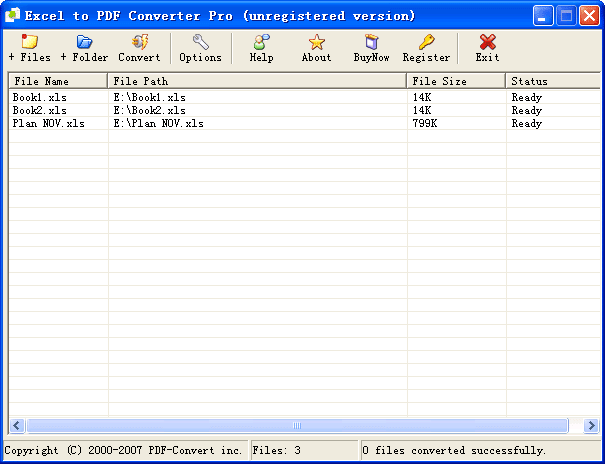
Main windowThe Excel to PDF Converter Pro Main Interface look like left picture. |
 Click to enlarge |
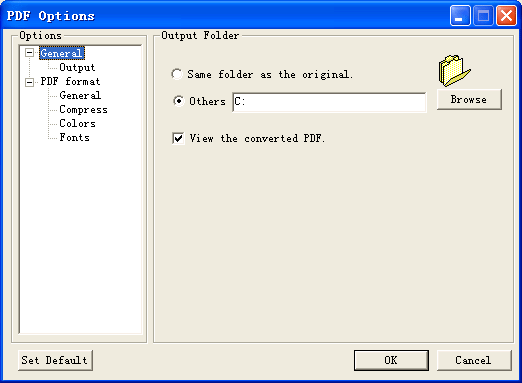
Setting windowClick "Options" button in the toolbar to open Setting dialog. From here, you merely need to change the entries in the GUI to suit your needs, and the PDF File will be produced according to your specifications. |
Download Excel to PDF Converter Pro now and receive a trial version to use for up to 30 times. After this you can buy your copy of Excel to PDF Converter Pro absolutely risk free as Excel to PDF Converter Pro comes with a 30-day money back and lifetime upgrade guarantee!
For our products we now have three download mirror sites: Download 1, Download 2, and Download 3. Therefore, if the download failed on your first attempt, please try again by clicking another link.
Buy Excel to PDF Converter Pro once and use it forever. No monthly fees, no hidden charges. In addition, we also release free updates and we provide free email support.
Instant Delivery! With Secure Online Ordering you can receive registration code via the e-mail once your order is accepted, and you can activate the current trial version for full use.

DOC to Image Converter is the fast, easiest way to convert word DOC, Docx to professional-quality JPG/Tiff/Bmp/Eps/Ps file format
Price: $38.00

PDF to Image Converter is a batch image converter that convert PDF documents to image(JPG/TIFF/Bmp/Eps/Ps).
Price: $49.95

We want you to be 100% satisfied, so we offer an unconditional 30 Day Money Back Guarantee.

All products are free to upgrade. Just download the latest version at the web page, your license code will be available forever!